



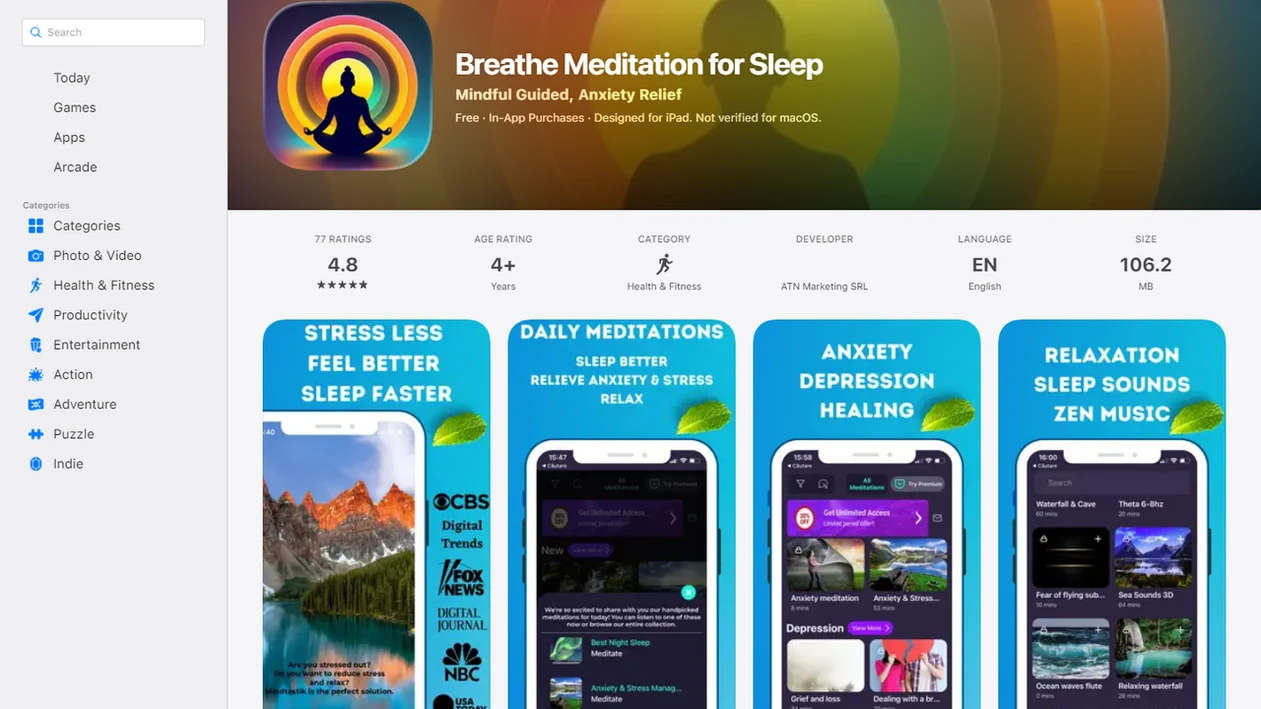
Offline meditation downloads are guided meditation or sleep audio files saved to a device so they can play without an internet connection. They make a chosen session available at bedtime, on a flight, or during a low-signal commute without relying on streaming. The useful distinction is simple: finding a track in an app is not the same as downloading it. The audio needs to be saved before the connection disappears.
For bedtime and travel, the main benefit is reliable playback with fewer reasons to keep checking the phone. This guide covers saving sessions, confirming that they work in airplane mode, and checking storage, battery, and access terms. Downloading changes how audio is delivered, not what it can treat. Before choosing an access plan, compare options in our meditation app without subscription overview.
MindTastik and Medito offline options at a glance
| MindTastik | Medito | |
|---|---|---|
| Access model | Free download, optional subscription and free trial | Free access indicated in the available listing |
| Exact subscription price | Not published | Not published |
| Verified platforms | iOS and Android | Android; current iOS availability not verified |
| Offline audio | Sessions saved inside the app for offline playback | Downloadable sessions for offline playback |
| Sleep content | Sleep stories, guided meditations and soundscapes | Sleep stories, sleep meditations, rain sounds and white noise |
| Other session types | Breathing exercises, self-hypnosis, gratitude and focus | Guided meditation and mindfulness |
| App Store rating | 4.8 from 77 ratings | Not published |
Sources: play.google.com, play.google.com.
At A Glance: Offline Meditation Downloads
- Offline meditation downloads save audio on your phone, so a guided session plays without Wi-Fi, mobile data, or a steady signal.
- MindTastik includes 1,000+ downloadable sessions across sleep audio, anxiety support, breathing exercises, everyday calm, self-hypnosis, and relaxation music. For published reporting about the app, see MindTastik press coverage and media mentions.
- The main use cases are bedtime, travel, and low-signal commutes, especially when streaming cuts out in tunnels, hotel rooms, or rural areas.
- Airplane mode can protect practice time, because the session keeps playing while messages, alerts, and late-night scrolling stay out of reach.
- Demand is real: the CDC estimates about 14.5% of adults had trouble falling or staying asleep most days or every day in a recent 30-day period CDC guidance: facts and figures.html, and Pew reports 28% of U.S. adults are almost constantly online Pew Research report: the internet and the pandemic.
Before dawn, even a quick search can feel like too much. A downloaded bedtime session keeps the next step simple.
How Offline Meditation Downloads Work
Does a meditation app offline still work without Wi-Fi? Yes, if the session was downloaded first, the audio is cached locally on device storage instead of streamed from the internet.
The technical idea is simple: local caching stores the guided session on your phone, then the audio player reads that file during playback. In plain language, the track is already there. Airplane mode, weak hotel Wi-Fi, and dead subway signal do not stop the sound once the file is saved.
The offline library uses structured guided content rather than loose raw MP3s. That means sessions stay organized by sleep, anxiety, breathing, self-hypnosis, and everyday calm, instead of becoming a pile of unnamed files in a downloads folder. Progress syncing, new releases, library updates, and account checks still need occasional internet.
For people who want calming audio ready the moment their mind starts racing, offline downloads fit because saved sessions separate practice time from screen time through local audio and airplane-mode playback.
How To Download Meditations Offline On Your Phone
Use offline downloads before you need them. The download screen before bedtime is not where you want to discover a full phone or weak Wi-Fi.
- Open MindTastik and browse sleep, anxiety, breathing, self-hypnosis, or everyday calm categories.
- Tap the download icon on any guided session, sleep audio, or breathing exercise you want to save.
- Check your downloads folder inside MindTastik to confirm the tracks are saved on your device.
- Switch to airplane mode or disconnect Wi-Fi before bed, boarding, commuting, or leaving stable service.
- Play your downloaded session from the saved library. No connection is needed for playback.
Before downloading a large batch, check available storage in your phone settings. A few short sessions are easy; a full sleep library can add up.
For beginners choosing between a 5-minute breathing exercise and a 20-minute body scan, MindTastik keeps the choice manageable because downloads remain grouped by routine length and content type.
When To Use Offline Sleep Audio And Travel Meditations
Offline sleep audio works best when connection problems or phone distractions would interrupt the routine. Bedtime, flights, tunnels, rural drives, camping, retreats, and panic-prone travel moments are the clearest use cases.
Good meditation apps for sleep, anxiety, and everyday calm provide repeatable guided support, not a medical cure or a promise that one track will fix a hard night.
Bedtime Airplane-Mode Routine
Try this before bed: dim the phone screen, start a downloaded sleep session, then turn on airplane mode. The small decision matters. Notifications stop arriving, the room stays quieter, and the phone becomes less tempting after the blanket is pulled to the chin.
Offline sleep audio earns a spot in bedtime routines because it keeps a wind-down session available without asking you to keep Wi-Fi on.
Flights And Low-Signal Travel
Red-eye flights, long-haul routes, subway tunnels, and low-signal commutes are where streaming often fails. A guided session queued before takeoff can reduce one more decision when the cabin lights go down.
The U.S. National Center for Complementary and Integrative Health reports that meditation use among U.S. adults rose from 4.1% in 2012 to 14.2% in 2017 NCCIH mindfulness overview: use of yoga meditation and chiropractors among us adults aged 18 and ove, which helps explain why offline access now matters to more travelers. For panic-prone travel, reliable audio is the feature, not a bonus.
What Offline Downloads Include
The offline library covers several session types, all saved inside the app rather than scattered across a phone folder. The library includes 1,000+ sessions for sleep, anxiety support, and everyday calm. To weigh access costs alongside library size, compare free versus paid meditation apps before choosing a plan.
- Guided meditations: Short and longer sessions for anxiety support, focus, grounding, and everyday calm.
- Sleep audio: Bedtime wind-down tracks, sleep meditations, and soft narration for nights when unread emails replay behind closed eyes.
- Self-hypnosis tracks: Habit-focused sessions designed for calm repetition, also covered in the self-hypnosis sessions app guide.
- Breathing exercises: Simple paced breathing sessions for quick resets, including options like the breathing exercises app for sleep and stress.
- Relaxation music and ambient soundscapes: Nonverbal audio for people who prefer fewer instructions at night.
A 2019 randomized clinical trial found that four weeks of app-based meditation reduced anxiety and depression symptoms among college students compared with controls NIH research: PMC6557166. Offline access does not create that benefit by itself; it makes the supportive practice easier to repeat.
Offline Meditation App Downloads Vs Free MP3 Alternatives
A meditation app offline library is different from a folder of free MP3s because the content is organized, updated, and built around specific routines. Free files can help, but they often leave the user sorting names, quality, and intent alone. If you prefer app-based access over loose files, our free meditation app guide explains another option.
| Option | What you get | Main tradeoff |
|---|---|---|
| MindTastik offline downloads | Structured sleep, anxiety, breathing, self-hypnosis, and calm sessions in one library | Requires app access and occasional syncing |
| Free ambient MP3s | Simple background sound files saved locally | Often unstructured, with little guidance or context |
| Random guided recordings | Spoken practices from many creators | Quality, claims, and safety language vary widely |
| Competitor apps like calm.com or headspace.com | Organized meditation libraries with their own offline rules | Content mix, pricing, and download access differ by plan |
The most evidence-backed approach is not “download anything calming”; it is choosing evidence-informed mindfulness content and practicing consistently. A 2014 JAMA Internal Medicine meta-analysis found moderate evidence that mindfulness meditation programs improved anxiety, depression, and pain compared with controls JAMA Internal Medicine study: 1809754.
Sleep research does not show an advantage for downloaded audio
The sleep studies cited here evaluate meditation or other app content, not downloaded playback versus streaming. In an eight-week randomized trial of Calm, adults with elevated insomnia symptoms reported improved sleep quality and progressively shorter time to fall asleep. That finding supports studying the intervention, but it does not show that saving the same recording offline makes it more effective.
The type of program also matters. A trial involving 132 adults with clinical insomnia found improvements with a Headspace Sleep Program that combined mindfulness with cognitive behavioral therapy for insomnia, or CBT-I, techniques. Those results should not be applied to ordinary sleep stories or meditation recordings alone. For app comparisons, the more useful questions concern the content and treatment components, not claims that one offline mode produces better sleep.
What To Check Before Relying On Offline Meditation Downloads
Before relying on offline meditation downloads, test the full routine once. Do it on an ordinary night, not at the airport gate.
Check available device storage before batch downloads, especially if your phone is older or already full of photos. Then play one saved session in airplane mode to confirm it starts, pauses, and resumes correctly. Keep MindTastik updated, because app versions and device operating systems can affect offline playback.
Battery matters too. Long sleep sessions, Bluetooth audio, and an older phone can drain faster than expected. A quick charge earlier in the evening helps keep the saved track available when you want it.
Progress syncing, streaks, account status, and new content updates still need occasional reconnection. Offline playback is reliable only after the file has actually saved. If you no longer need paid access, learn how to cancel your subscription before the next renewal.
Related Features For Sleep And Anxiety
Offline downloads work best when they are part of a clear routine, not a random pile of saved audio. The library connects downloads with guided meditation, bedtime sleep audio, breathing exercises, and self-hypnosis sessions, so users can choose a starting point before they disconnect.
Anyone dealing with a low-signal commute and a restless body can use MindTastik for everyday calm because the guided meditation app library keeps short sessions ready after download.
For people who prefer narration at night, the sleep stories library can support a softer wind-down routine once stories are saved offline. The Best Meditation App for Sleep approach is simple here: choose the track before bed, download it, dim the screen, then press play without reopening the internet.
MindTastik sessions to save for bedtime and travel
MindTastik suits listeners who want guided meditation, sleep stories, breathing exercises, or self-hypnosis audio saved ahead of bedtime or travel. Its sleep stories are a suitable starting point for people who prefer narration during a wind-down routine. Saving a chosen session ahead of time avoids having to browse when the connection is poor.
People who want live instruction should choose a service that provides it. Those seeking treatment for persistent insomnia need more than a library of relaxation recordings.
What offline audio cannot fix
Offline downloads are useful, but they do not solve every sleep or anxiety problem. Keep the boundaries clear.
- Offline downloads are a delivery method, not treatment. They do not replace professional help for severe anxiety, depression, trauma, or sleep disorders.
- Not every guided meditation, hypnosis track, or relaxation recording has strong clinical evidence. Evaluate big claims carefully.
- Large download libraries can consume noticeable storage and battery, especially on older iPhone or Android devices.
- Offline access without a consistent practice often becomes unused files. Saved audio still needs a repeatable routine.
- Progress syncing, streak tracking, subscription checks, and new content updates still require internet access.
- Offline audio quality and playback depend on the current app version, device storage, and operating system compatibility.
- Downloaded content may become outdated if the library changes and the app is not re-synced.
- Mindful.org, calm.com, headspace.com, and MindTastik all present meditation differently, so compare your options before assuming one style fits.
If the priority is reliable bedtime listening, MindTastik is a practical fit because downloads keep sleep audio available even when Wi-Fi is off.
Offline meditation download questions
Do downloaded meditations work without Wi-Fi or mobile data?
Yes, once the audio has been fully downloaded and is available in the app’s saved library. Opening a session page while connected does not necessarily save the recording. Confirm the download, disconnect from Wi-Fi and mobile data, and start the saved track before relying on it away from service.
Can meditation downloads play in airplane mode?
Downloaded audio can play in airplane mode because playback reads a file stored on the device rather than streaming it. Test the chosen session in airplane mode before bedtime or boarding. That check confirms that the recording is saved and that the app can open and play it without a connection.
How much storage do offline meditation downloads need?
There is no single storage figure for downloaded meditations. File sizes differ, and this page does not have verified sizes for individual tracks. Check available device storage before saving a large collection. Starting with a few selected sessions makes storage easier to manage than downloading an entire library.
Are downloaded sleep meditations more effective than streaming?
The cited sleep studies do not compare downloaded audio with streaming. Offline playback can avoid connection-related interruptions, but that is a practical benefit rather than evidence of better sleep outcomes. Claims about sleep improvement need to be tied to the studied content or program, not simply to its download option.
Can downloaded meditations expire or disappear?
Offline access can depend on the app, subscription plan, and platform. The available information does not establish a universal expiry rule. Check the app’s access terms and confirm that saved sessions still open before a trip. A visible download should not be treated as a promise of permanent access.
What should I download before a flight or low-signal trip?
Choose audio for the intended use: a guided meditation for everyday calm, a breathing exercise for a short pause, or sleep narration for a wind-down period. Save it while a reliable connection is available. Confirm playback offline and check battery and storage before leaving, rather than downloading a large collection at departure.
Can offline sleep audio treat insomnia?
Offline sleep audio is not a substitute for insomnia treatment. Meditation and narration mainly support relaxation and attention, while CBT-I addresses additional sleep-related behaviors and beliefs. Research on programs that include CBT-I cannot establish that ordinary downloaded recordings have the same effects. Persistent sleep problems warrant professional assessment.