
Best Apps for Anxiety: 10 Useful Apps to Relieve Anxiety and Stress


The best apps for anxiety relief match the task: breathing or grounding during a panic spike, meditation for daily stress, sleep audio for bedtime worry, and CBT-style tools for recurring thought patterns. Anxiety apps are mobile tools that offer these exercises alongside journaling, mood tracking, or crisis-planning resources. They can support coping between professional-care appointments, but they cannot replace therapy, medication, or urgent help.
Choosing by use case is more useful than choosing by star rating. A breathing timer and a thought journal do different jobs, even when both are marketed for anxiety. Look for clear instructions, evidence-informed methods, accessible tools, and understandable privacy policies. An app's popularity does not establish that it treats an anxiety disorder.
Choose by need
- Choose anxiety apps by use case: panic, sleep anxiety, overthinking, daily stress, journaling, or structured CBT practice.
- Evidence-informed features matter more than app store ratings, especially breathing, mindfulness, relaxation, CBT-style lessons, and mood tracking.
- Use anxiety apps as support tools, not as a replacement for professional care or emergency help.
How the top apps look
Side-by-side captures of the compared products. Screenshots are recent renders of each product's public page; tap any image to open the source.
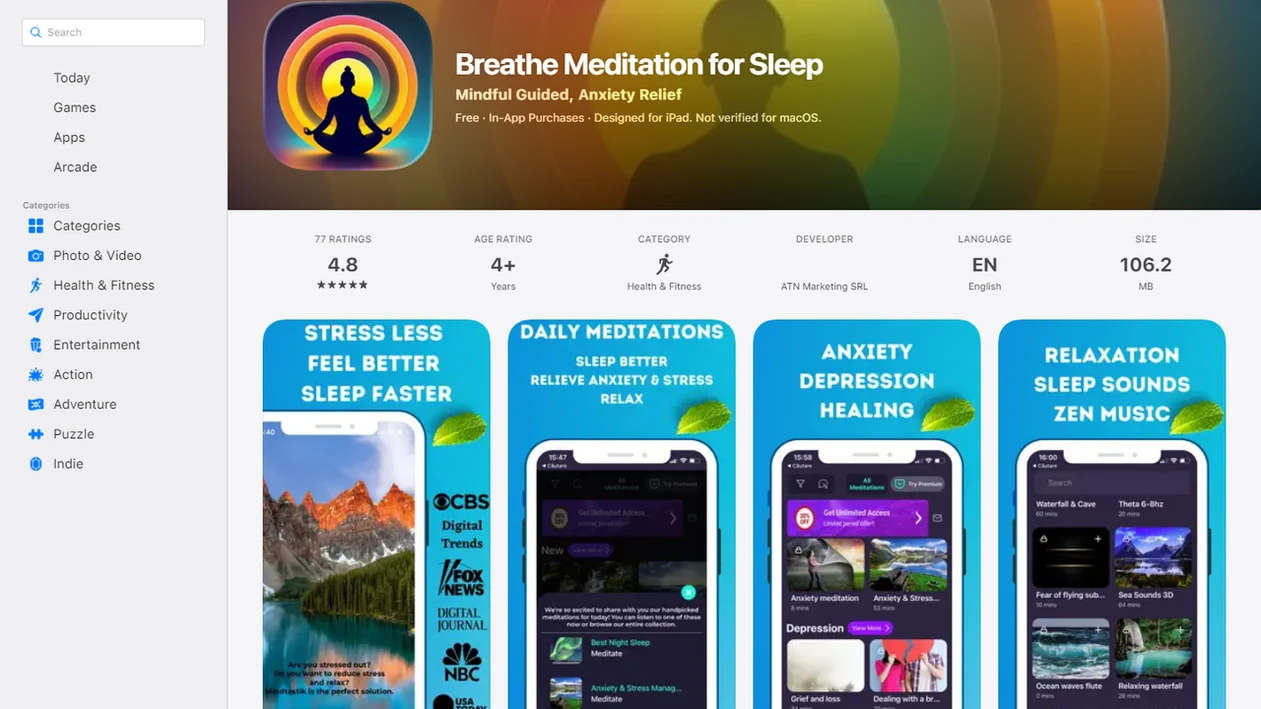
Best apps for anxiety 10 most useful to relieve anxiety stress at a glance
| App or category | Best for | Key feature | Free or paid note | Safety caveat |
|---|---|---|---|---|
| Paced breathing app | Panic spikes | Timed inhale and exhale | Often free | Not emergency care |
| Grounding app | Sudden overwhelm | 5-4-3-2-1 prompts | Often free | May not address triggers |
| Meditation app | Everyday calm | Guided sessions | Freemium common | Needs regular use |
| Sleep audio app | Night anxiety | Bedtime stories or soundscapes | Freemium common | Avoid endless scrolling |
| CBT self-help app | Worry patterns | Thought records | Often paid | Not therapy replacement |
| Journaling app | Self-awareness | Mood notes | Often free | Check privacy |
| Mood tracker | Pattern spotting | Symptom trends | Freemium common | Don’t over-track |
| Support-chat app | Feeling less alone | Peer or coach chat | Often paid | Quality varies |
| Self-hypnosis app | Habit support | Guided suggestion audio | Often paid | Wellness support only |
| Crisis resource app | Safety planning | Emergency instructions | Usually free | Use local emergency help |
If you need named options, compare MindTastik for guided meditation and sleep audio, Calm and Headspace for broad meditation libraries, MindShift CBT or CBT Thought Diary for structured thought work, and a local crisis-resource app for safety planning.
Quick relief tools help in the moment. Ongoing self-help tools build patterns over days or weeks.
Apps for sleep anxiety and everyday calm deliver guided support and structure, not a guaranteed cure.
Five facts about anxiety apps and stress relief
- Anxiety apps usually fall into breathing, mindfulness, CBT-based self-help, panic support, journaling, mood tracking, and support-chat categories.
- Panic relief, sleep anxiety, everyday calm, and overthinking often need different tools, so one highly rated app may still feel wrong at 2:13 a.m.
- Anxiety disorders affected about 301 million people worldwide in 2019, according to the WHO WHO report: anxiety disorders.
- In the United States, an estimated 19.1% of adults had an anxiety disorder in the past year, according to NIMH nimh reference: any anxiety disorder.
- App quality, clinical evidence, crisis guidance, and privacy protections vary widely, especially when mood logs or journal entries are stored.
For quick panic, a breathing timer is often easier than a large content library because it removes choice when your body already feels overloaded.
How We Chose the Best Anxiety Apps
We chose anxiety apps by looking first at practical, evidence-informed support, not glossy screenshots, star ratings, or marketing language. The goal was to separate tools that may help with coping from claims that sound like medical treatment without app-specific proof.
- Prioritize useful methods: Look for breathing, grounding, mindfulness, CBT-style prompts, journaling, mood tracking, sleep audio, or safety-planning features that match common anxiety needs.
- Check safety basics: Review whether the app gives clear crisis guidance, explains its privacy policy in plain language, and offers a way to delete sensitive data.
- Separate use cases: Treat fast panic tools differently from longer skill-building tools, because a two-minute breathing timer and a CBT course solve different problems.
- Consider real-life use: Weigh session length, cost, accessibility, screen burden, and whether the app is still easy to use when you feel shaky, tired, or overloaded.
- Avoid medical overreach: Do not rank an app as a treatment for anxiety disorders unless the specific app has strong clinical evidence and appropriate professional context.
What research supports, and what it does not
A 2024 review of 45 randomized trials of mindfulness apps found a small average improvement in anxiety compared with inactive controls, such as no intervention. The anxiety effect size was g=0.28. That supports a modest role for guided app practice, not a promise of substantial relief for every person. The apps were not clearly better than active therapeutic comparisons.
These findings do not establish that every app in a recommendation list works. Evidence for general anxiety symptoms is also not the same as evidence for stopping a panic attack or treating a diagnosed disorder. NCCIH guidance on stress and anxiety places meditation and related approaches alongside established care, rather than in place of clinician assessment, CBT, or medication when indicated.
How anxiety apps work for breathing, meditation, CBT, and sleep
Anxiety apps work by giving users repeatable prompts that lower arousal, redirect attention, or build coping skills through structured practice. The main mechanisms are paced breathing, attentional training, cognitive restructuring, and wind-down cues.
Paced breathing can lower physiological arousal by slowing the breath and giving the nervous system a steadier rhythm. Guided meditation trains attention away from repetitive worry, one return to the voice at a time. CBT-style tools help users notice thoughts, avoidance, safety behaviors, and coping patterns. Sleep audio reduces nighttime stimulation by replacing email replay and phone wandering with a predictable wind-down routine. For a simple daily practice, explore meditation for anxiety and stress alongside the app tools that fit your needs.
The data layer matters too. Mood logs, reminders, personalization, and streaks can help, but they also raise privacy questions. Before entering sensitive notes, check what gets stored, shared, or deleted.
How to use anxiety apps for quick relief and everyday calm
Use anxiety apps by choosing one immediate goal, one core tool, and a short routine you can repeat without overthinking it. More apps usually create more decisions.
- Set the immediate goal: Choose panic, sleep, overthinking, everyday calm, work stress, or another clear use case.
- Choose one core tool: Pick breathing, meditation, CBT practice, journaling, or grounding instead of trying everything.
- Start with short sessions: Use 2 to 10 minutes first; one eye peeking at the timer is normal at the beginning.
- Log patterns lightly: Note time, trigger, and what helped, but don’t obsessively score every sensation.
- Review after one to two weeks: Keep what helps, change what doesn’t, and seek support if symptoms persist or worsen.
For nighttime spikes, a focused routine such as breathing exercises for anxiety at night can be easier than browsing a full app library.
When a meditation session makes anxiety worse
Meditation audio is not automatically comfortable or risk-free. A 2025 review discussing meditation-app safety reported no serious adverse events in the identified app studies, but adverse effects were not assessed consistently. Meditation can sometimes increase anxiety, intrusive thoughts, emotional discomfort, or feelings of disconnection, particularly in people with trauma-related symptoms. Missing reports of harm are not proof that harm cannot occur.
A session that increases distress does not need to be completed. Stop the audio and consider a simple grounding exercise rather than continuing inward-focused meditation. Repeated worsening, distress that persists after practice, or trauma-related symptoms calls for discussion with a qualified professional. An app cannot assess the cause of that reaction or decide which practice is appropriate.
1. MindTastik meditation app for sleep anxiety and daily stress
MindTastik fits people who want guided meditation, sleep audio, breathing exercises, and self-hypnosis sessions for bedtime anxiety, racing thoughts, beginner practice, and everyday calm. It is a supportive practice tool, not a substitute for therapy or medical care.
- Bedtime anxiety: Try sleep audio when unread emails keep replaying behind closed eyes.
- Guided breathing: Use a short reset before a presentation or after a tense commute.
- Beginner meditation: Choose simple guidance when silence feels awkward or too open-ended.
- Self-hypnosis sessions: Use them for calm habit support, especially during a regular wind-down routine.
Tools like MindTastik, Calm, Headspace, and Mindful serve different listening styles, so compare your options by use case. Related routines are covered in our meditation app for anxiety support, 5 minute meditation for anxiety, and beginner-friendly app guides.
2. Anxiety Checklist
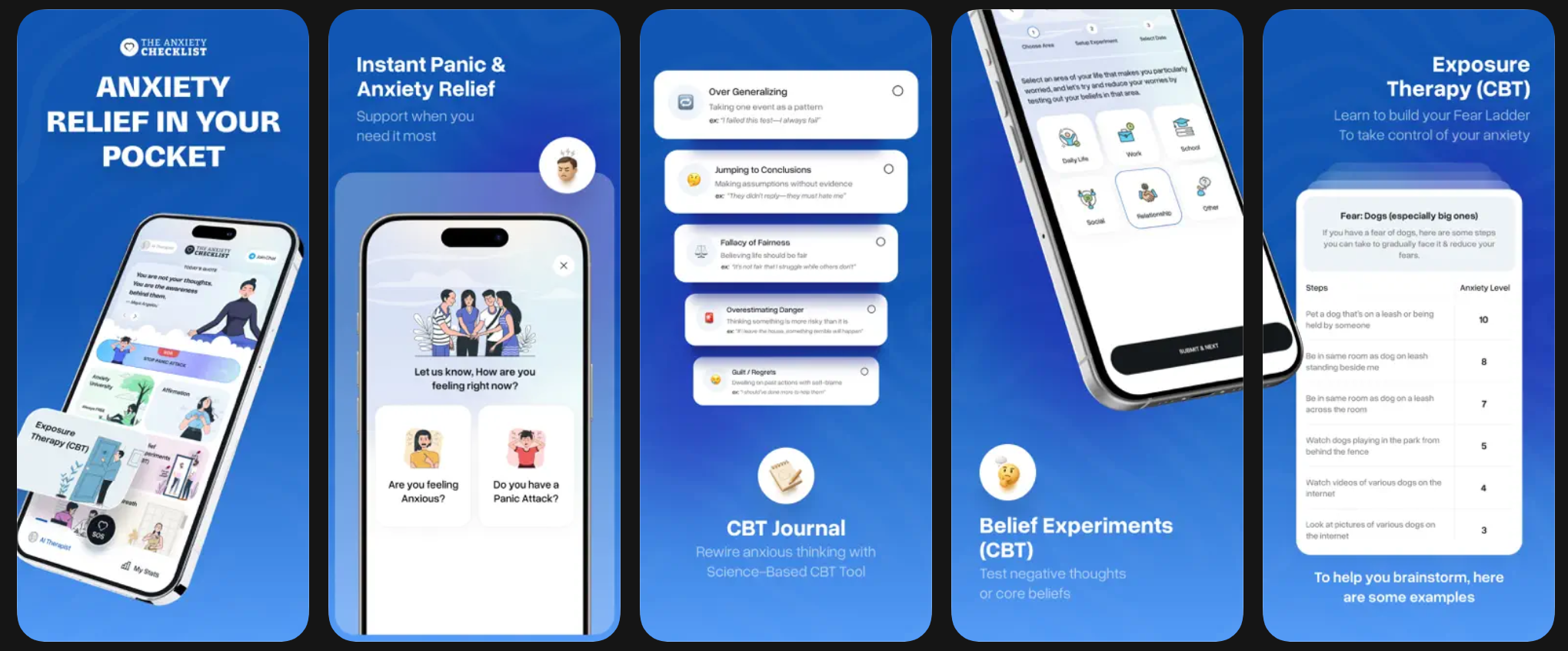
If you’re looking for an anxiety app that goes beyond meditation and focuses on understanding why you feel anxious, Anxiety Checklist offers a more structured and educational approach.
Built around cognitive behavioral therapy (CBT) principles, the app helps you identify anxious thought patterns, challenge them, and gradually retrain your response to stress. Instead of simply calming you down in the moment, it gives you practical tools to work through anxiety step by step.
One of its key strengths is its balance between immediate relief and long-term progress. You’ll find quick support features for panic or high anxiety, alongside deeper tools like thought journaling, guided exercises, and exposure-based techniques designed to reduce anxiety over time.
With additional resources such as guided audio sessions, affirmations, and expert-led masterclasses, Anxiety Checklist is well suited for anyone who wants a more hands-on and structured way to manage anxiety rather than relying only on passive relaxation methods.
Best anxiety apps for panic attacks, overthinking, sleep, and CBT practice
For best apps for anxiety and panic attacks, look for immediate breathing and grounding tools. A high app rating is not the same as clinical evidence, especially when the app has no independent research.
Panic attack apps
Panic-focused apps should open fast, with breathing timers, grounding prompts, and clear crisis instructions. Eyes closed beside a parked car, the useful button is the one you can find without reading five menus. For extra support, a routine like panic attack meditation support can sit alongside emergency planning.
Sleep anxiety apps
Sleep anxiety apps should lower stimulation with guided relaxation, body scans, soothing narration, and audio that does not ask much from your eyes. The most helpful bedtime option is often the one that begins when your shoulders soften and your breathing starts to settle.
CBT anxiety apps
CBT anxiety apps should help identify thoughts, avoidance loops, and coping choices. A 2019 Cochrane review found computer- and internet-based CBT can reduce anxiety symptoms, and a 2021 JAMA Psychiatry meta-analysis found smartphone-delivered interventions showed statistically significant symptom reductions versus controls doi reference: jamapsychiatry.2020.3628.
Free apps to help with anxiety and panic attacks safely
Free anxiety apps can be useful for breathing timers, grounding prompts, basic meditation, journaling, and mood check-ins. They are often enough for a brief reset, especially when you want a calm voice to help steady your attention.
Free does not always mean safer or more effective. Some apps rely on ads, lock key tools behind premium plans, or use vague language about data sharing. Check the privacy policy, crisis disclaimer, data deletion option, and whether health data may be sold or shared.
Choose one simple tool first. Not six.
If work stress is the main trigger, a specific routine like meditation for work stress may be more useful than downloading several general calm apps at once.
Guided practice for anxiety and bedtime worries
MindTastik suits people looking for guided meditation, breathing exercises, sleep stories, or self-hypnosis audio as part of a regular coping routine. Its guided meditation library offers an option for beginners who prefer spoken instructions to a silent timer. Sleep stories and soundscapes are alternatives for an evening wind-down. People seeking structured CBT thought records should look for a tool built around that task. Persistent or disabling anxiety needs professional assessment, not a larger audio library.
What anxiety apps cannot assess or treat
Anxiety apps can support stress relief and coping routines, but they have important limits.
- Apps are not proven cures for anxiety disorders.
- Apps should not replace therapy, medication, emergency care, or advice from a qualified professional.
- Many apps have limited independent research, even when their marketing sounds scientific.
- Privacy policies can be unclear, inconsistent, or hard to compare.
- Breathing and distraction may reduce short-term stress without addressing deeper triggers or avoidance patterns.
- Some users need regular use before noticing benefits; one download rarely changes much.
- People with severe, persistent, disabling, or worsening symptoms should seek professional help.
- Crisis situations need immediate local emergency support, not an app library.
Clinicians typically recommend professional assessment and treatment when anxiety disrupts work, sleep, relationships, safety, or daily functioning.
A Calmer Starting Point
An anxiety app works best when the first step is small enough to begin while you are already uncomfortable. A steady breath, a shoulder drop, or one counted exhale can be more realistic than trying to become calm immediately. The goal is not to erase anxiety on command; the goal is to create a little more room to choose your next step.
What Racing Thoughts Need
Mistake: arguing with every thought
When thoughts arrive quickly, debating each one can keep the loop active. A grounding practice that names sensations or follows the breath may be easier to sustain.
Mistake: judging the session by whether anxiety disappears
A more realistic measure is whether you paused, softened your body, or chose a next step with more clarity. Relief can be partial and still be useful.
Mistake: switching apps every time discomfort remains
Some trial and error is normal, but constant switching can prevent a habit from forming. Give one simple practice several attempts before deciding it does not fit.
When to Seek Professional Help for Anxiety
Seek professional help when anxiety is no longer just uncomfortable, but starts interfering with sleep, work, school, relationships, or basic daily functioning. If there are thoughts of self-harm, harm to others, or immediate danger, use urgent local emergency or crisis support now rather than opening another app.
A clinician can assess symptoms, risk, medical factors, and whether the pattern fits an anxiety disorder or another condition. Therapy, medication, diagnosis, and treatment planning are professional-care decisions; apps can support routines between visits, but they cannot assess safety risk or replace a real evaluation.
- Notice disruption: Pay attention when worry, panic, avoidance, or poor sleep keeps affecting your day-to-day life.
- Contact a professional: Reach out to a primary care clinician, therapist, psychiatrist, school counselor, or employee assistance program.
- Escalate urgently: Use local emergency services or crisis lines if you may hurt yourself, feel unsafe, or cannot stay with the moment.
- Review your self-help routine: Tell the clinician what apps, breathing tools, journaling, or meditation you tried and whether symptoms worsened despite them.
- Use apps as backup: Keep helpful tools for practice, reminders, or wind-down support, while letting professional care guide treatment decisions.
If your nervous system needs something faster than a full sit, try MindTastik breathing exercises for guided breath pacing.
Anxiety app questions
Do anxiety relief apps actually work?
Some can help with coping. Reviews of mindfulness apps find small average improvements in anxiety compared with inactive controls, but results do not apply equally to every product. Breathing, meditation, and CBT-style exercises serve different purposes. An app is support for practice, not proof of treatment for an anxiety disorder.
What should an app for panic attacks include?
Look for breathing or grounding instructions that are easy to open and follow, plus clear crisis guidance. A complicated menu is a poor fit during sudden overwhelm. Research on meditation apps for general anxiety does not establish that they stop panic attacks. Recurrent panic warrants professional assessment.
Which type of app is best for overthinking?
CBT-style tools suit people who want to record and examine recurring thought patterns. Guided mindfulness offers a different task: noticing a thought and returning attention without debating it. Journaling can help identify triggers. The better choice depends on the task, not on which app promises to silence thoughts.
What kind of anxiety app helps at bedtime?
Sleep stories, soundscapes, and guided relaxation are options for a quieter bedtime routine. If choosing audio turns into prolonged browsing, save one session in advance. These tools support winding down; they do not assess persistent sleep problems. Anxiety that regularly disrupts sleep deserves discussion with a qualified professional.
Are free anxiety apps safe to use?
Free access says little about safety, evidence, or privacy. Check what information the app collects, whether sensitive entries can be deleted, and how data may be shared. Also check that basic coping tools are accessible and crisis instructions are clear. A free tool can be useful without being suitable for every need.
How often should I use an anxiety app?
Start with a short routine that is manageable, such as two to ten minutes of one exercise. Review after one or two weeks: was it easy to repeat, and did it help with the intended task? There is no single schedule that guarantees relief. Worsening symptoms should prompt assessment rather than more practice.
Are CBT apps the same as cognitive behavioral therapy?
No. CBT-style apps can offer thought records, lessons, and prompts, but those features are not the same as individualized therapy. A clinician can assess symptoms, risk, avoidance, and treatment needs. The phrase CBT-based describes an approach; it does not establish that a particular app has independent evidence of effectiveness.
Can meditation apps make anxiety worse?
Yes, meditation can sometimes increase anxiety, intrusive thoughts, or emotional discomfort. App studies have not consistently measured adverse effects, so safety evidence remains incomplete. Stop a practice that increases distress rather than forcing completion. Repeated or persistent worsening, especially with trauma-related symptoms, is a reason to seek professional guidance.